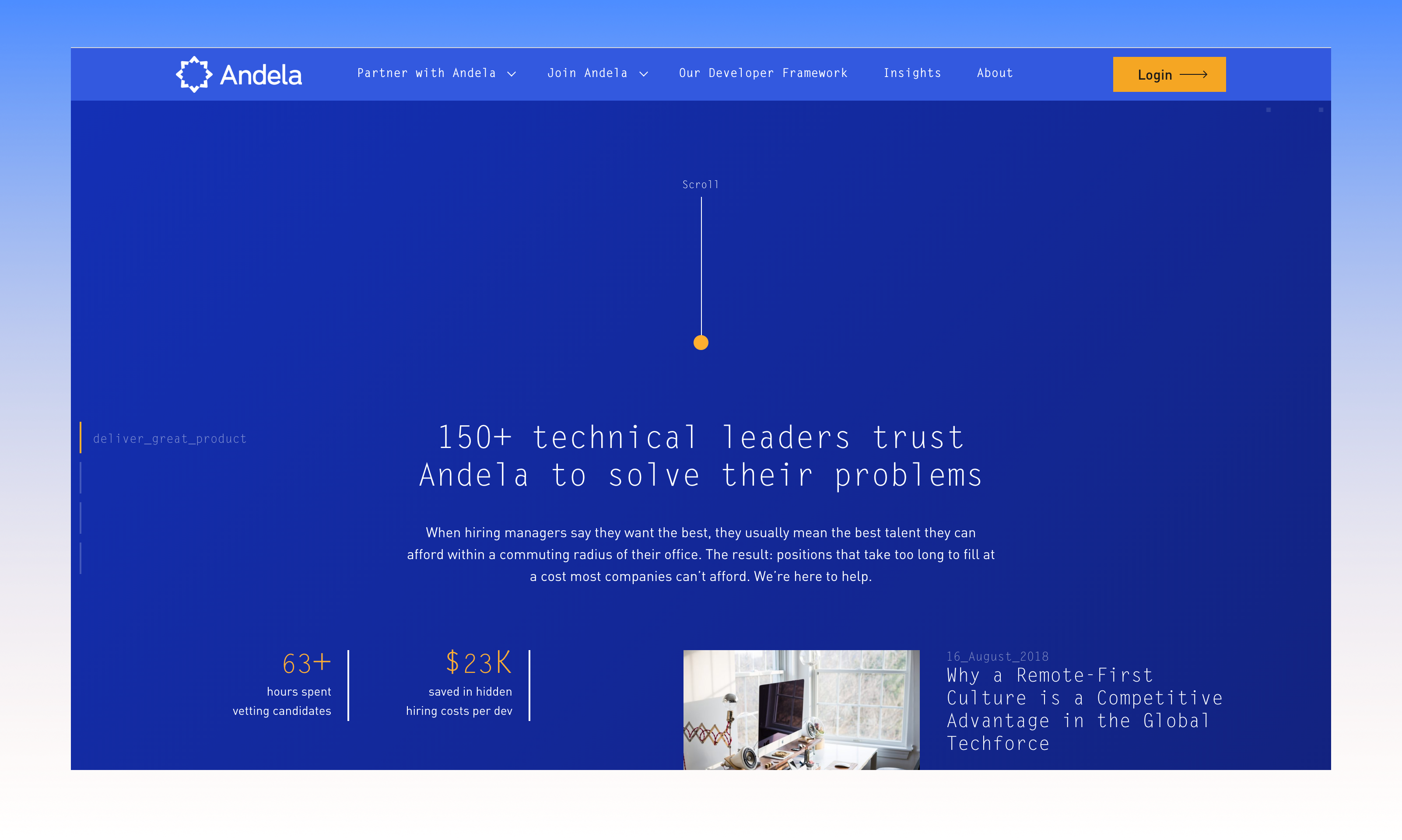
Context
Andela connects vetted software engineers across Africa with technical leaders who need to grow their teams without being limited by a commuting radius. By 2018 the company had moved past its early matching-by-hand days and needed a real platform: partners managing dozens of developers across multiple engagements, internal staff tracking partner health at a portfolio level, and developers themselves needing a place to grow, get feedback, and stay connected to peers despite working from different cities and time zones.
The problem wasn't a lack of talent or a lack of demand — it was a lack of visibility. Partners couldn't see how their distributed team was performing without asking around. Technical Success Managers were juggling spreadsheets to track twenty accounts at once. Developers had no structured channel for feedback or mentorship beyond whatever their manager happened to send over Slack.
Partner Portal
A home base for partner companies to see their engagement at a glance — who's on the team, how they're performing, and where the relationship stands.
TSM Dashboard
A portfolio view for Technical Success Managers managing many partner accounts simultaneously, surfacing health and tasks that need attention.
Pairing & Mentorship
A live, side-by-side code and video environment connecting developers with learning facilitators and peers despite physical distance.
Staffing Engine
An internal matching tool that turns a partner's hiring brief into a ranked, reservable shortlist of available developers.
Approach
Four distinct user groups, one connected system. Rather than designing each surface in isolation, the work started from a shared question: what does each role need to see, in what order, to make a confident decision quickly? The rating data a developer receives, the health score a TSM monitors, and the shortlist a staffing specialist builds are all the same underlying signal, surfaced differently for each audience.
Map the roles
Defined four primary personas — Partner, TSM, Developer, Staffing Specialist — and the one decision each dashboard exists to support.
Prototype in InVision
Built clickable, multi-step flows so internal stakeholders could react to real interaction sequences, not static screens.
Test with real tasks
Walked partners and TSMs through the rating flow and the staffing wizard end-to-end, watching where they hesitated.
Unify the system
Standardised cards, status colours, and rating scales across all four products so a "developer card" looked the same everywhere it appeared.
Partner portal & account health
The partner-facing portal needed to answer one question fast: is my engagement healthy? The homepage leads with account information — start date, team size, and the Andela support staff assigned — then breaks down per-developer metrics like productivity hours, active days, and commit frequency, so a partner never has to ask a TSM for a status update they could see themselves.
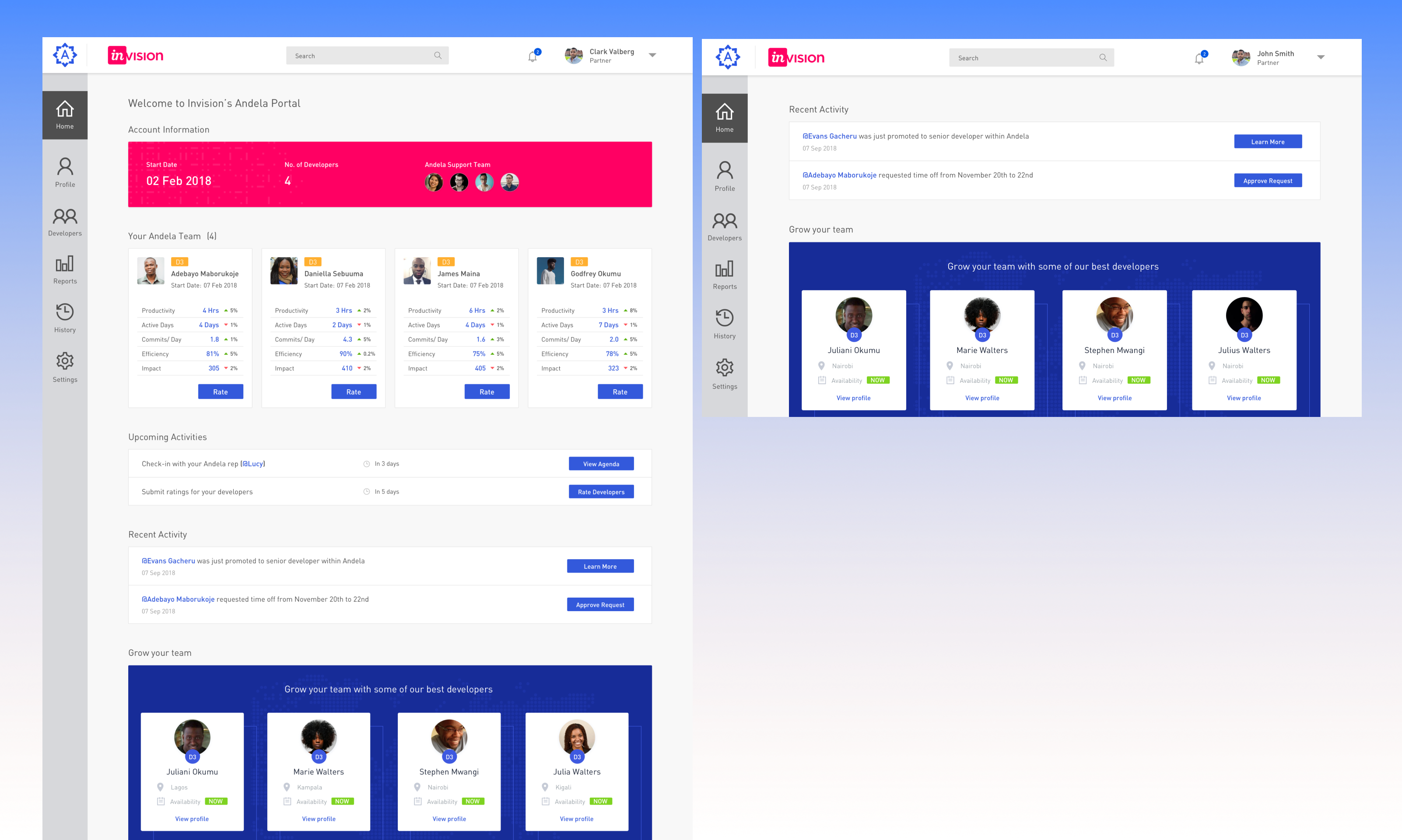
FIG. 01 — Partner portal: account overview, per-developer metrics, and team growth suggestions
Below the team breakdown sits a quietly important feature: an upcoming activities and recent activity feed. Promotions, time-off requests, and rating reminders surface as discrete cards with clear actions attached, so the partner's attention goes straight to what needs a decision — approve a request, view a promotion, or rate a developer — instead of getting lost in a wall of status text.
The same screen doubles as a quiet growth channel: a "Grow your team" module surfaces available developers who match the partner's existing stack directly inside the dashboard they already check daily, turning account health into a soft upsell rather than a separate sales conversation.
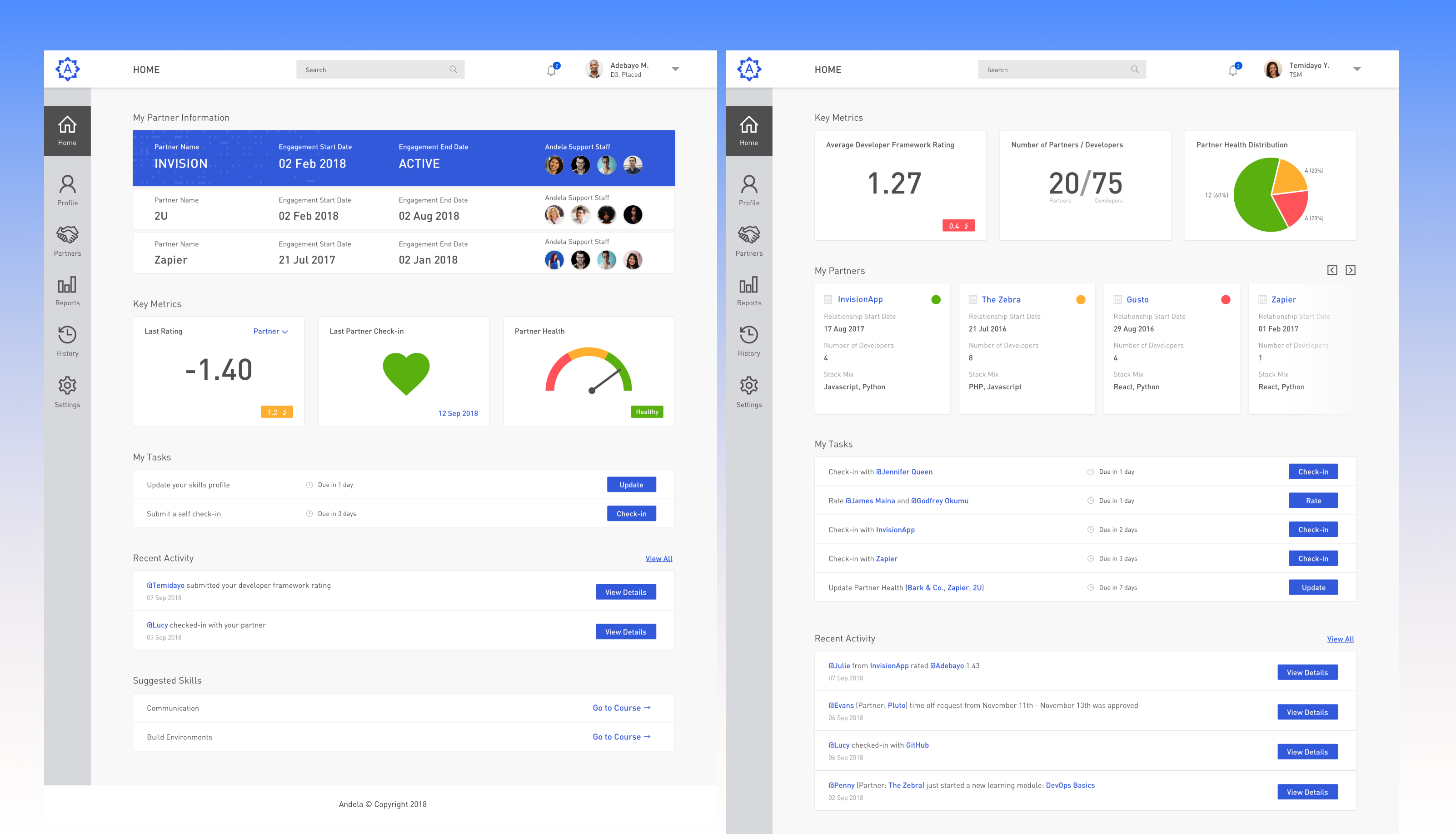
FIG. 02 — TSM dashboard: portfolio-level health, partner directory, and a unified task queue
For Technical Success Managers, the same underlying data gets rolled up a level. Instead of one engagement, a TSM is watching twenty — so the dashboard leads with portfolio metrics (average rating, total developers placed, partner health distribution as a quick pie chart) and a partner directory with status dots instead of paragraphs. The "My Tasks" list merges check-ins, ratings due, and partner-health updates from every account into a single prioritised queue, so nothing falls through the cracks of a spreadsheet.
Developer rating & feedback
Performance feedback is the most sensitive interaction on the platform — it directly affects a developer's livelihood and a partner's confidence in the engagement. The rating modal was designed to make that exchange feel structured and fair rather than arbitrary: every dimension (quality, quantity, initiative, communication, professionalism, integration) is grouped under Work or Team, scored on the same five-point scale, with the previous rating shown for context.
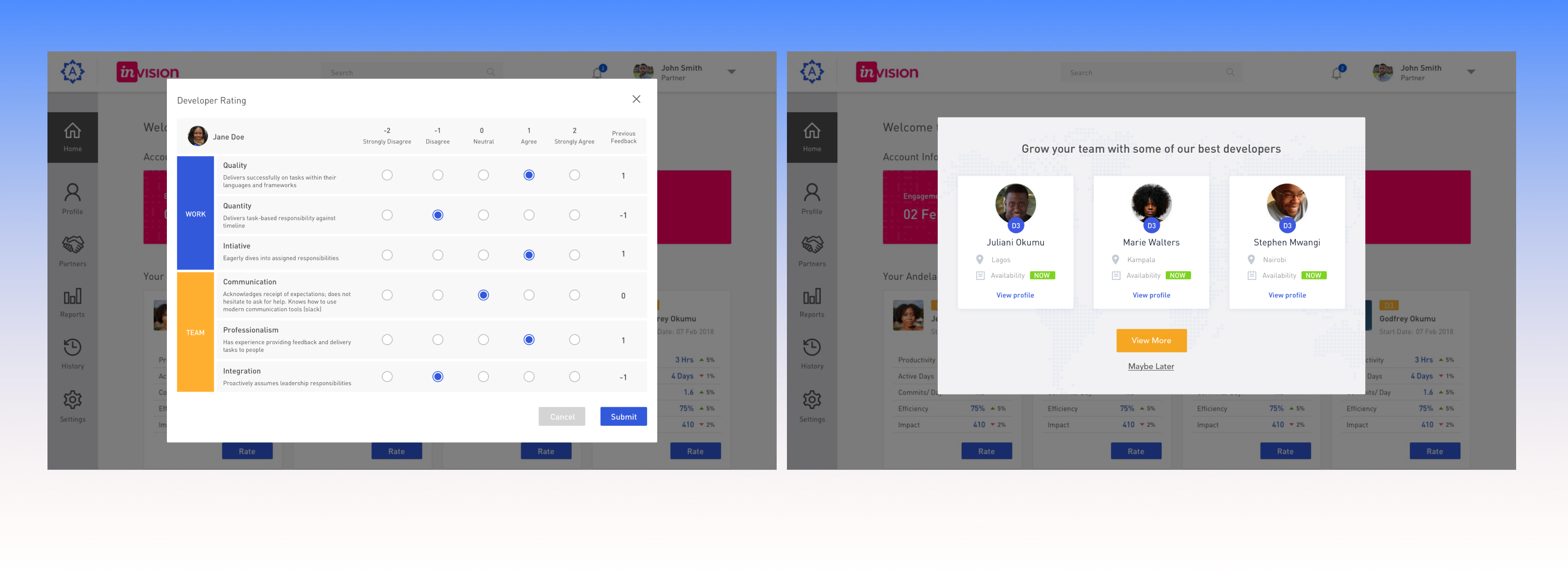
FIG. 03 — Structured rating modal with named dimensions, and a lightweight team-growth prompt
I want to know exactly what I'm being asked to judge — not guess at what "good" means on a 1-to-5 scale.
A number with no context just feels like a grade. I want to see which specific thing I should work on next.
If rating takes more than two minutes per developer, it won't happen consistently across twenty accounts.
Don't make me leave the page I'm already on to find more developers — show me who's available right here.
Naming each criterion — and showing the previous score alongside the new one — turned the rating modal from a compliance task into a feedback conversation, while keeping the underlying scale simple enough to fill out for a whole team in minutes, not hours.
Pairing & mentorship
Andela's developer cohorts learn through structured pairing with learning facilitators and peers — but distributed teams can't pair at a shared desk. The pairing interface puts two editors side by side under a shared fellow roster, with live status (time connected, idle minutes, unread messages) shown right on each avatar so a facilitator managing twenty fellows can see at a glance who needs attention next.
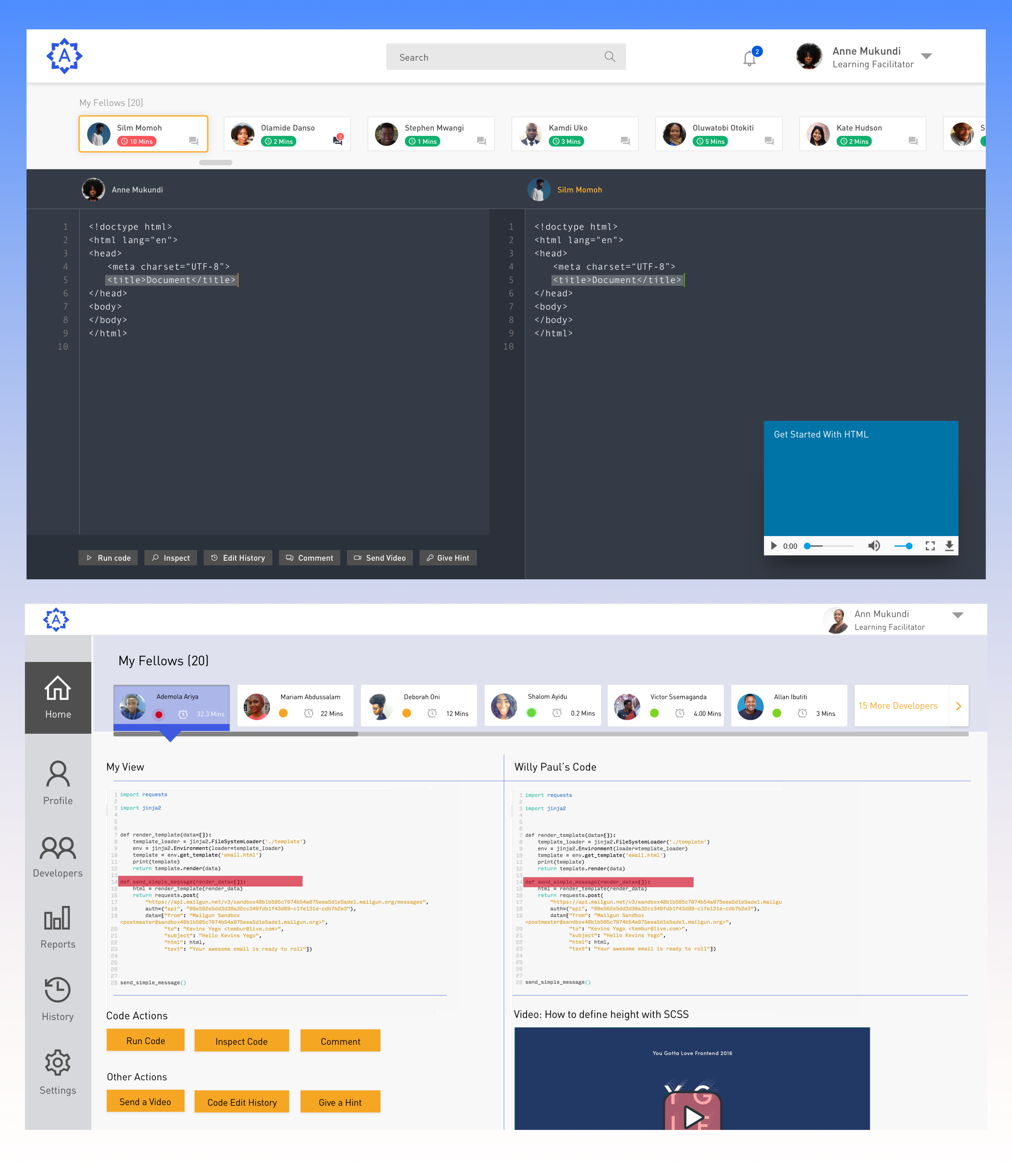
FIG. 04 — Live pairing view: synced code panes, inline video, and a facilitator's fellow roster
Below the live pairing session sits a second mode built for asynchronous review: a facilitator opens "My View" beside a fellow's code, with quick actions — run, inspect, comment, send a video, give a hint — surfaced as buttons rather than buried in menus, plus a small embedded video player for short, recorded walkthroughs that don't require a live call to schedule.
Reviewing code over a comment thread loses all the nuance. Being able to see their screen, talk it through, and leave a short video means I can give the kind of feedback I'd give in person.
— Learning Facilitator, AndelaStaffing engine
Matching a partner's hiring brief to the right developers was, before this project, a manual exercise in tribal knowledge — a staffing specialist asking around to remember who was available and who fit the stack. The staffing wizard turns that into a structured four-step flow: select the partner, review their stored profile (industry, languages, team size), confirm an expected start date, then narrow by secondary skill, industry experience, and domain area.
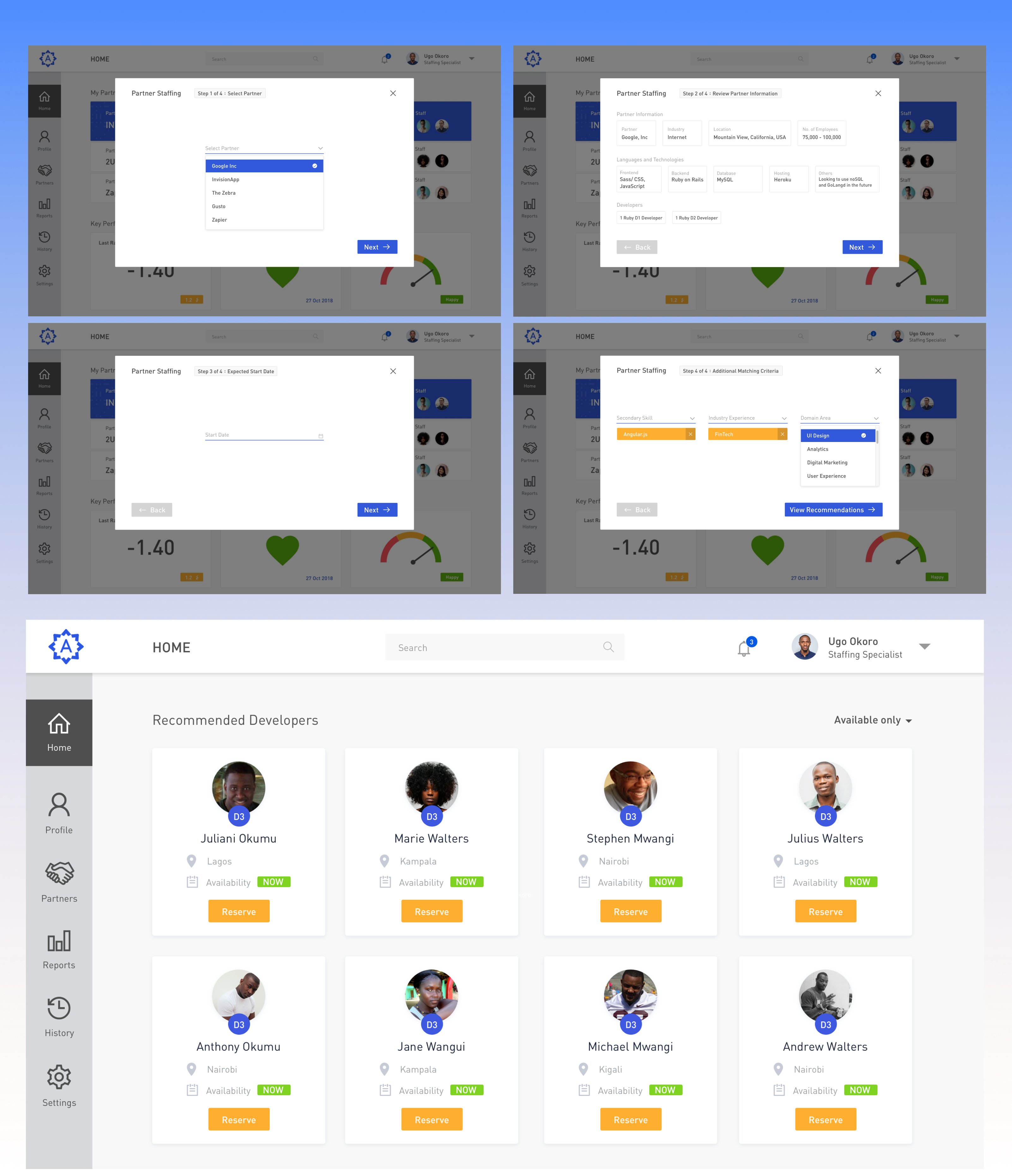
FIG. 05 — Staffing wizard: a four-step brief that resolves into a ranked, reservable shortlist
- Turn a hiring brief into candidates fast
- Avoid re-asking for info already on file
- See availability before recommending anyone
- Partner profile auto-fills from existing data
- Progress shown as Step X of 4, not a long form
- Filters stay optional — defaults to broad match
- One-click "Reserve" per shortlisted developer
- Availability badge removes back-and-forth emails
- Same developer card reused from the partner portal
The result of the wizard is a grid of recommended developers that deliberately reuses the same card component already familiar from the partner portal — name, location, availability badge, and now a single "Reserve" action. Consistency here wasn't a style preference; it meant a staffing specialist, a partner, and a TSM were all reading developer information from the same mental model, just with a different action button attached.
Outcome
The four products shipped as one coherent system rather than four disconnected tools — the same developer card, the same status colours, and the same rating scale carried through the partner portal, the TSM dashboard, the pairing interface, and the staffing engine. That consistency did real work: it meant a partner recognised information instantly even when seeing it through a different lens than the one a TSM or a staffing specialist used.
Structuring the rating modal around named, comparable criteria turned a once-arbitrary scoring task into something both partners and developers trusted, which in turn made the underlying account-health metrics on the partner and TSM dashboards meaningful rather than just decorative numbers. And by collapsing a manual, ask-around staffing process into a four-step wizard with reusable candidate cards, what used to require institutional memory became something any staffing specialist could do consistently.
- Partner portal with account & per-developer health
- TSM portfolio dashboard with unified task queue
- Structured developer rating modal
- Live pairing & asynchronous mentorship review
- Four-step partner staffing wizard
- One shared developer-card component, every surface
- Named rating criteria over an unlabelled number scale
- Status as colour + badge, never paragraph text
- Wizards over long forms for any multi-field task
- Partners self-serve account health instead of asking a TSM
- TSMs manage twenty accounts from one prioritised queue
- Staffing became a repeatable flow, not tribal knowledge
- Feedback became specific enough to act on